On this page · 7 sections

This guide covers the manual checks, bulk checking, what the result really tells you, and what to do with links Google can't see.
Why you check the linking page, not your own
A backlink lives on someone else's page, so its indexing status is that page's indexing status. Your own page can be fully indexed while the guest post linking to it has never been crawled.

Google finds links by crawling pages and processes what it fetches (Google: How Search works). If the linking page hasn't been crawled, Google hasn't seen the link. If it was crawled but not indexed, the page and its link aren't part of what Google stores and serves. Link builders treat an indexed linking page as the minimum condition for a link to count, and that's the right test to run.
That's also why Search Console has limited use here. You can't run URL Inspection on a page you don't own, and the Links report shows aggregated data, such as "Top linking sites", for your property (Google: Links report). Google says the report "isn't a comprehensive list of every link" and "shows a sample of internal and external links." It tells you some of the sites Google knows link to you. It doesn't tell you whether each individual linking page is indexed right now.
Question | Where to find the answer |
|---|---|
Is my own page indexed? | URL Inspection in Search Console |
Which sites does Google know link to me? | Links report in Search Console (a sample) |
Is the page hosting this specific backlink indexed today? | A backlink index checker, or a manual search |
The background on why indexing decides whether a link counts is in our backlink indexing guide.
Manual checks: site: and exact-URL searches
You can check a single backlink by searching Google for the exact linking URL. It's free and quick, and it's fine for spot checks on a few links.
Two searches to try:
- site: with the full URL. Search
site:example.com/the-guest-post/. If the page appears, it's indexed. - A unique phrase from the page in quotes. Copy a distinctive sentence from the article and search it in quotation marks. If the linking page appears, Google has it.
The limits are real. Google's own documentation for the site: operator says "the list of URLs returned is not always exhaustive", and that an indexed URL "can show up" in results but it's "not guaranteed" (Google: site: search operator). So:
- A result is good evidence the page is indexed.
- No result is weak evidence it isn't. Try the phrase search before concluding anything.
- Exact URLs matter.
httpvshttps,wwwvs bare domain, trailing slashes and tracking parameters can all point to different URLs. Check the canonical version of the page. - Manual checks don't scale. Twenty links is tedious; two hundred is a lost afternoon, with no record of what you found last time.
Checking backlinks in bulk
For more than a handful of links, use a backlink indexing checker that takes a list of linking URLs and returns a status for each one. Bulk checking is the only realistic way to audit a campaign, a client's link profile or a batch of paid placements.
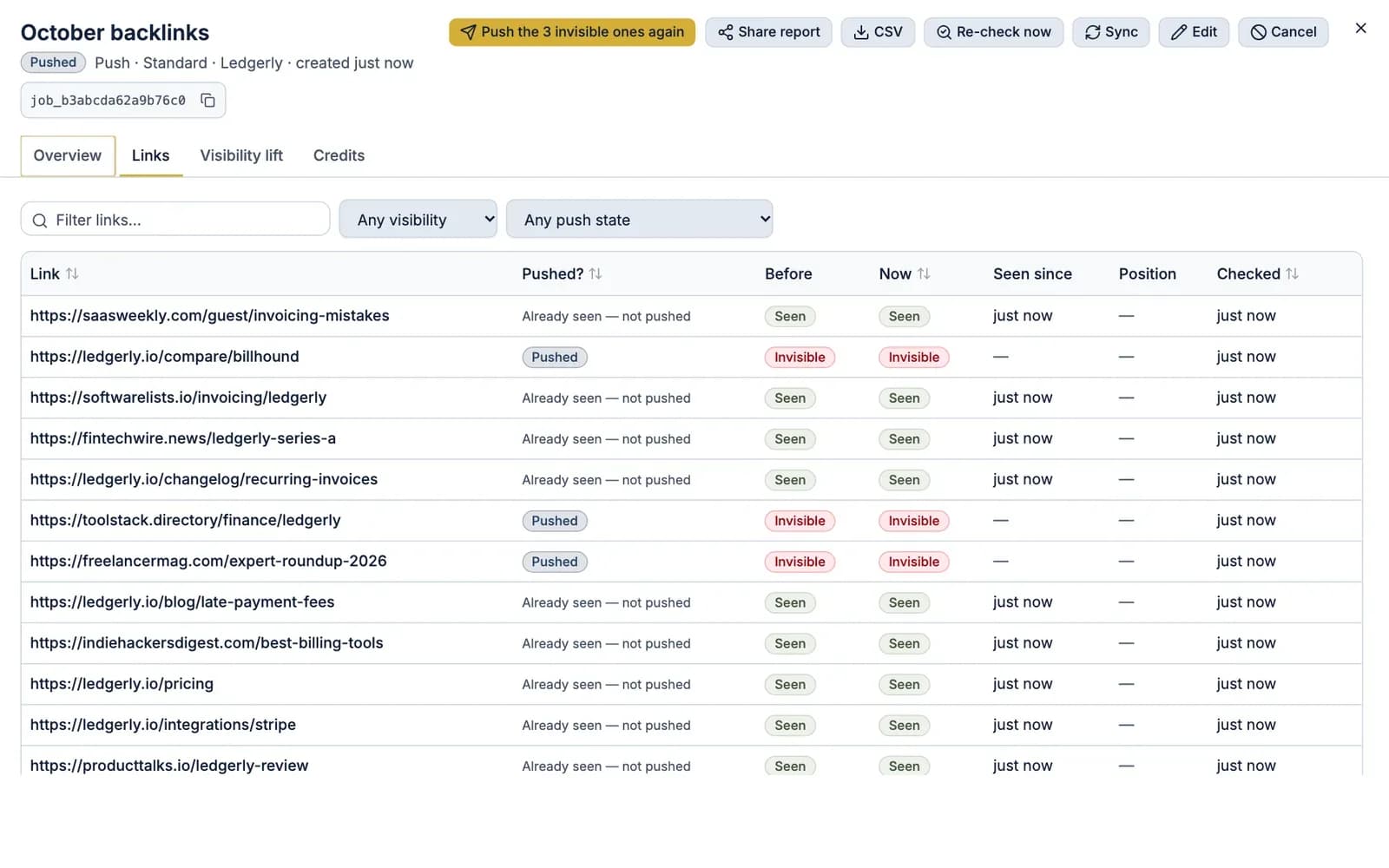
How to run a clean bulk check:
- Export the exact linking URLs from your link tracker, outreach sheet or vendor report. Root domains aren't enough.
- Deduplicate and normalize. Remove repeats and tracking parameters, and use the canonical form of each URL.
- Run the check. Each URL gets an indexed or not-indexed result with a date.
- Keep the results. You'll compare them with the next run.
Look for a tool that works on any domain, gives per-URL results with timestamps, exports cleanly, and makes re-checks easy. Results can vary between runs, so re-check over a few days before acting on a single "not indexed". Our bulk index checker guide covers what to look for in more detail. In FreshlyCited you can check backlinks in bulk: each link is marked seen by Google or invisible, at one check credit per link.
What 'indexed' does and doesn't tell you about a link
An indexed linking page tells you Google has stored the page; it doesn't, by itself, tell you the link is still there, followed or valuable. Treat indexing as a necessary check, then confirm the rest.
What "indexed" tells you
- Google has crawled and stored the linking page.
- The page is eligible to appear in search results.
- At some point Google processed the page's content, including the links on it.
What it doesn't tell you
- That the link is still on the page. Publishers edit and remove links. Open the page and confirm.
- That the version Google stored contains the link. If your link was added after Google's last crawl, Google may not have seen it yet.
- How the link is qualified. Check for
rel="nofollow",rel="sponsored"orrel="ugc". Google asks sites to qualify paid and user-generated links this way (Google: Qualify your outbound links). - Whether Google values the link. Google's spam policies treat links intended to manipulate rankings as link spam (Google: Spam policies). An indexed link on a link farm is still a link on a link farm.
- Ranking impact. No index checker can tell you how much a specific link moves rankings.
A quick per-link audit after the index check: page is live (200), link present, rel attributes as expected, no noindex meta tag or X-Robots-Tag header, and the page's canonical points to itself rather than another URL.
What to do with unindexed backlinks
Unindexed backlinks need sorting before anything gets pushed, because some can be fixed, some can be pushed and some will never be indexed. Spending money on the wrong group is the most common waste in link indexing.
What you find | What to do |
|---|---|
Page returns 404, 410 or 5xx | Contact the publisher; don't push |
Link removed from the page | Follow up with the publisher; don't push |
| Ask the publisher to lift it; a push can't override it |
Canonical points to another URL | Check whether the canonical version carries your link |
New page, otherwise healthy | Push it, then re-check |
Deep page with no internal links | Ask the host to link to it from a category or related post, and push it |
Thin, spun or link-farm page | Consider replacing the link; Google may never index it |
Be honest with yourself about the last row. Low-quality pages often stay unindexed no matter what you do, and no tool can force Google to index anything. Pushing them costs money and doesn't change the page.
For the healthy, live, indexable pages that remain, a push asks Google to look. You can't use Search Console's Request indexing on someone else's site, which is why backlink pushes exist. Push only the links your check found unindexed; paying to push links Google already has buys nothing.
Re-checking after a push
A push is a request, not a result, so you only know it worked when a re-check shows the linking page indexed. Plan re-checks into every campaign.
- Give Google time. Google says crawling "can take anywhere from a few days to a few weeks", and requesting a recrawl repeatedly "won't get it crawled any faster" (Google: Ask Google to recrawl your URLs).
- Re-check the pushed links once that window has passed, and again a few weeks later for stragglers.
- Re-check paid links monthly. Pages get pruned, redesigned or dropped from the index. A link that was indexed in March can be gone by June.
- Don't push the same link repeatedly. If a healthy page is still unindexed after a couple of rounds, the issue is the page. Replace the link or ask the publisher to improve its internal linking.
AI answers cite what's been crawled, and they lean toward pages that are kept current. FreshlyCited helps Google discover and index the pages, posts and backlinks you publish or update sooner, so they become eligible for Google Search, AI Overviews and AI Mode, then re-checks and shows you what Google has indexed. The same logic applies to coverage of your brand: Google says a page must be "indexed and eligible to be shown in Google Search with a snippet" to appear as a supporting link in AI Overviews or AI Mode (Google: AI features and your website). An unindexed review that mentions you can't be cited there.
Sharing link-by-link results with clients
Clients who pay for links want to see which ones Google can see, link by link, not a single percentage. A clear report turns your index checks into a record of delivery.
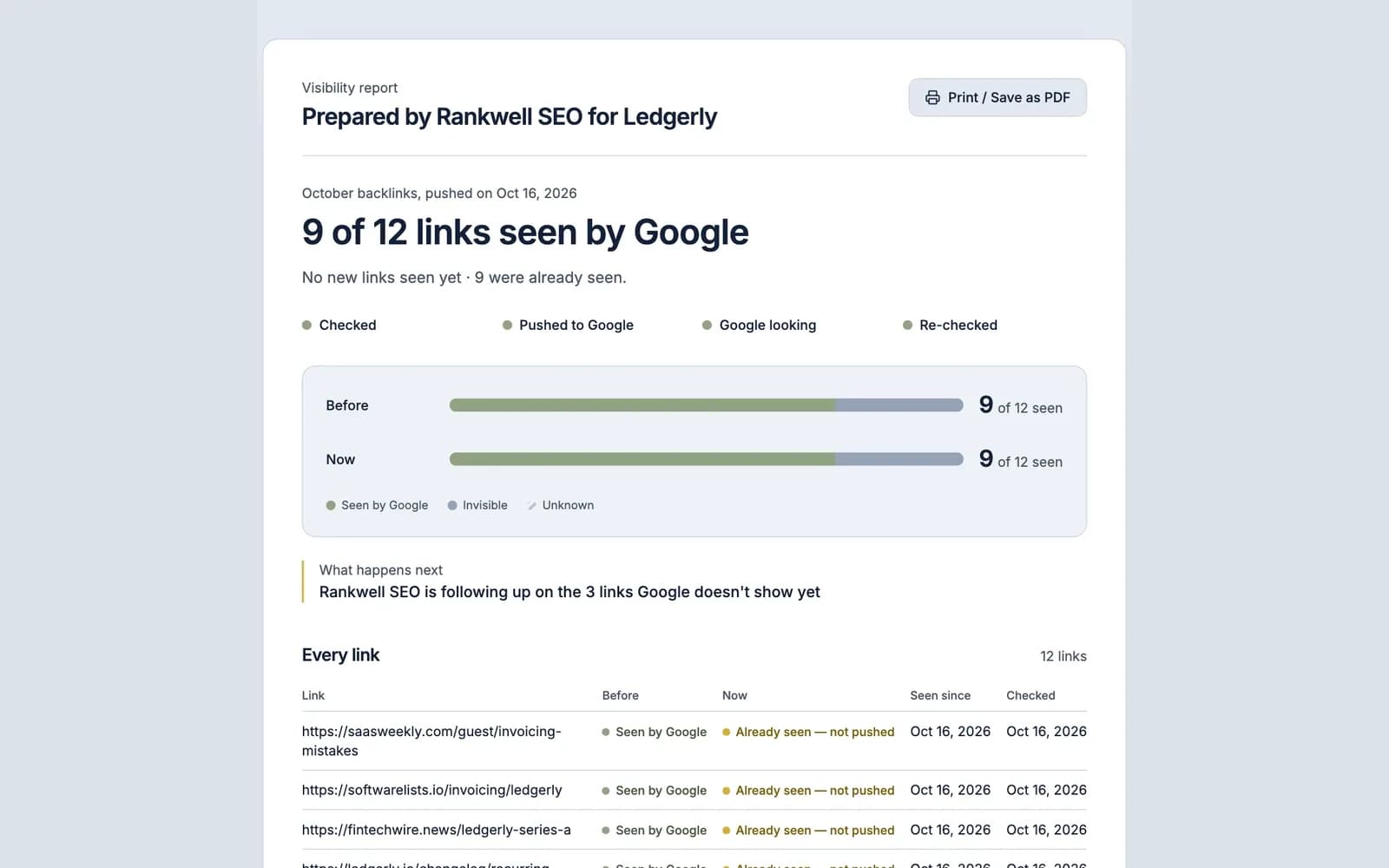
A useful client report includes:
- Every linking URL in the campaign, with the anchor and target page.
- Status before: indexed or not, with the check date.
- Action taken: pushed, fixed with the publisher, replaced or left alone, and why.
- Status after: the re-check result and its date.
- The links that still aren't indexed, with an honest note on each. Hiding them costs more trust than showing them.
Keep the format consistent month to month so clients can compare. A shareable link is easier than a spreadsheet attachment, as long as you can revoke it when the engagement ends. You can share link-by-link results from each push, with before and after per link. If link building is the core of your business, see FreshlyCited for link builders for how checks, pushes and reports fit together.
To see which of your own backlinks Google can see today, check your own links free.

Written by