On this page · 7 sections
What your client sees
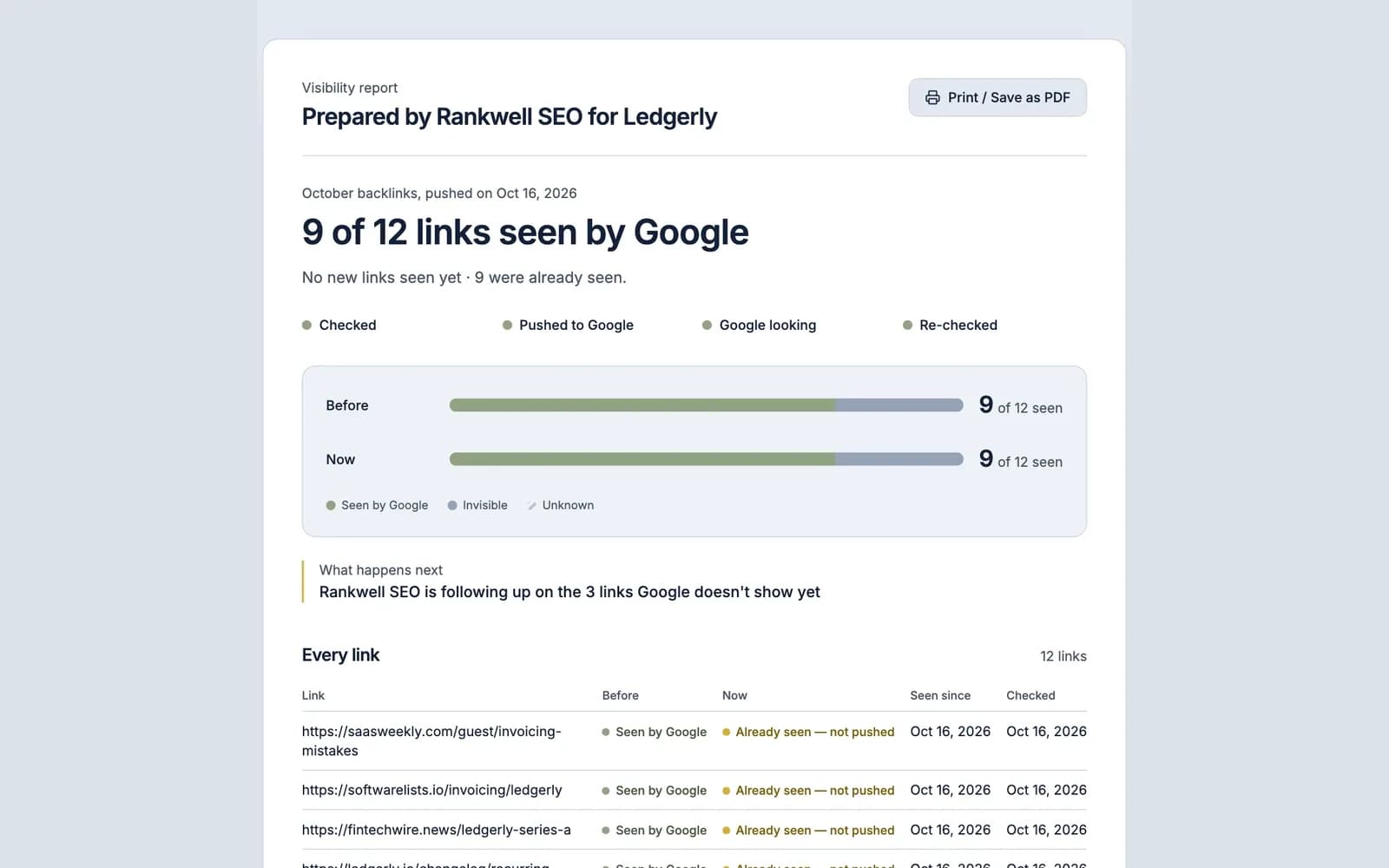
Your client sees, on one page, what you delivered and whether Google has seen it. The report opens with the outcome in plain words, then shows the detail underneath.
What's on the report:
- A letterhead: "Prepared by [your agency] for [client]", with your branding on Agency plans.
- The headline outcome, for example "33 of 40 links seen by Google (+14)" (illustrative).
- Where the work stands: checked, pushed, crawling or re-checked.
- Visibility lift: how many links were seen by Google before, and how many are now.
- A link-by-link table: each URL, its status before, its status now, and the date it was first seen by Google.
There are no logins, no dashboards to learn and no screenshots to paste. The client clicks a link and sees the result.
Your agency's brand, by plan
On Agency plans the report is headed with your agency's brand and your client's workspace name, so it reads as your work. How far the white-label goes depends on your plan:
Plan | Report branding |
|---|---|
Free | FreshlyCited-branded, with a "Powered by FreshlyCited" line |
Agency Starter | Your logo, plus a "Powered by FreshlyCited" line |
Agency Pro | Full white-label: your logo, colours and sender name on reports and emails; no "Powered by FreshlyCited" line |
Agency Scale | Full white-label plus reports on your own custom domain |
Vendor details behind the scenes are never shown to your client, on any plan. Your agency name comes from your workspace, and client names from your client workspaces, so there's nothing to configure per report. Plan prices and limits are on the pricing section.
Before and after, link by link
The before-and-after view shows what changed because of the work. Every smart push starts with a visibility check, so the report knows which links Google already saw before you acted. After the re-checks on days 1, 3 and 7, it shows which ones are seen now.
Column | What it shows |
|---|---|
URL | The page or backlink you delivered |
Before | Seen by Google or invisible when the push started |
Now | Status at the latest check |
Seen since | The date Google was first seen to have it |
Links that Google already saw are marked "Already seen — not pushed", so the client can see which links didn't need a push. The report shows up to the first 2,000 links of a push; for longer lists it says so and the full list stays available to you as a CSV export.
Share a link, print to PDF, revoke any time
Sharing is one click: Share report creates a private link you can copy into an email or your monthly report. The page has a print button that produces a clean, client-ready PDF.

- Always current. The link shows the latest result, so a client who opens it after a re-check sees the updated numbers.
- Revocable. Stop sharing and the link stops working immediately.
- Private. Report pages are marked
noindexand stay out of search results. - Counted. You can see how many times the report has been viewed.
Client workspaces
Client workspaces keep each client's pushes, checks, credits and reports separate. Create a workspace per client, move credits into it from your agency balance, and run pushes there. Reports pick up the client's name automatically.
Plan | Client workspaces | Read-only client portal |
|---|---|---|
Free | 1 | No |
Agency Starter | 10 | Yes |
Agency Pro | Unlimited | Yes |
Agency Scale | Unlimited | Yes |
Solo users never see any of this until they add their first client. On Agency plans, a client who wants to look without changing anything can have read-only access to their own workspace through the client portal.
Using FreshlyCited reports in your monthly SEO reporting
FreshlyCited reports cover one part of a monthly SEO report: whether delivered links and pages are indexed in Google. They don't replace your rankings, traffic or conversion reporting.
A simple way to combine them:
- Run each link batch or content release as a push. Each link is re-checked on days 1, 3 and 7, so the report settles a week after the last link is sent.
- In your monthly report, add a "Work delivered" section with one line per push ("40 links delivered; 33 seen by Google") and the report link.
- Keep rankings, traffic and conversions in your usual reporting tool.
For the full structure, see our SEO client reporting guide and these SEO report examples.
Showing clients the AI-search angle
Clients increasingly ask about AI Overviews and ChatGPT. The honest answer starts with Google indexing: to appear as a link in AI Overviews or AI Mode, a page must be "indexed and eligible to be shown in Google Search with a snippet" (Google Search Central). The report shows that first step, page by page. ChatGPT, Perplexity and other assistants use their own crawlers and search partners. We don't submit to them, and we don't claim to, so the report makes no claim about them either.
Be clear with clients about what it doesn't show. A link or page being seen by Google makes it eligible for Google's AI answers; it doesn't mean it's cited, ranked or kept forever. We don't guarantee any of those, and the report doesn't claim them.
Who it's for: agencies and link builders who need to report delivery without rebuilding a spreadsheet every month. See FreshlyCited for agencies, or check your own links free.

Written by