On this page · 8 sections
- 01When you need a bulk index checker
- 02Free and manual options, and their limits
- 03What to look for: accuracy, speed, exports, API
- 04How to run a bulk index check in FreshlyCited
- 05Reading results: seen by Google vs invisible
- 06Push only the invisible URLs
- 07Schedule re-checks and report results to clients
- 08Bulk checks over API and MCP

This guide covers the free options and their limits, what to look for in a bulk Google index checker, and how to act on the results without paying to push pages Google already has.
When you need a bulk index checker
You need a bulk index checker when the number of URLs, or who owns them, rules out checking one at a time. The common cases look like this:
Situation | Typical list size | Why one-at-a-time fails |
|---|---|---|
Backlink campaign for a client | 50 to 2,000 linking pages | You don't own the sites, so URL Inspection can't see them |
Site migration or redesign | Hundreds to tens of thousands | You need a URL-level before and after, not a trend chart |
Programmatic or templated pages | Thousands | Large batches often sit in "Discovered - currently not indexed" |
Content refresh program | Dozens per month | You need to know Google stored the new version |
Agency client portfolio | Many sites at once | Separate Search Console logins don't scale |
If you only need to check a few pages on your own site, start with the methods in our Google index checker guide. A bulk tool earns its place once lists grow, recur or include third-party URLs.
Free and manual options, and their limits
The free options are site: searches, URL Inspection and the page indexing report, and each one is accurate in a narrow way. None of them gives you a reliable per-URL answer across a large mixed list.
site: searches. Google says the list of URLs returned "is not always exhaustive" and that an indexed URL "can show up" but it's "not guaranteed" (Google: site: search operator). That produces false negatives, and checking 1,000 URLs this way is not realistic.
URL Inspection. It's Google's authoritative answer for a single URL, but only on a verified property and only one URL at a time (Google: URL Inspection tool). Search Console also offers a URL Inspection API for owned properties, with a per-site quota of 2,000 calls a day (Search Console API usage limits). It helps developers but still excludes third-party URLs.
The page indexing report. It groups your URLs by status, but Google says its example lists are limited to 1,000 items and aren't guaranteed to show all URLs in a given status (Google: Page indexing report). It's built for spotting patterns, not checking a specific list.
Spreadsheet scripts that scrape search results. These tend to break, get rate-limited, and automated querying of Google Search isn't something to build a client workflow on.
The short version: free methods are good for diagnosis on your own site. For a bulk index check across mixed URLs, you need a dedicated tool.
What to look for: accuracy, speed, exports, API
A good bulk index checker gives you a trustworthy result per URL, keeps history, and gets out of your way. Use this checklist when comparing tools:
- Per-URL results. Every URL gets its own status. A single "73% indexed" figure isn't enough to act on.
- Timestamps and history. You need to know when each result was true, and to compare runs.
- Consistency over a single run. Results can differ between runs and between tools, because tools query Google in different ways and indexing itself changes. Any tool can return an occasional wrong result, so look for easy re-checks rather than claims of perfect accuracy.
- Any URL, any domain. Backlinks live on sites you don't control. Use a tool that doesn't depend on Search Console ownership.
- Reasonable speed for your volume. Overnight is fine for a monthly audit; a link builder checking daily needs faster turnaround. Ask vendors for typical times rather than best cases.
- Exports and sharing. CSV at minimum. A client-ready report saves hours if you work for others.
- API access. If lists come from a CRM, a link tracker or a CMS, an API removes copy-and-paste.
- Pricing per check. Large lists get expensive fast. Know what a check costs and whether you pay again to push URLs that are already indexed.
Be wary of any index checker or indexer that promises a fixed indexing rate. Google decides what it indexes, and no tool can force it.
How to run a bulk index check in FreshlyCited
In FreshlyCited, a bulk check is a paste-and-go flow: you add the URLs, FreshlyCited checks each one, and you get a per-URL result you can act on. Here's what happens:
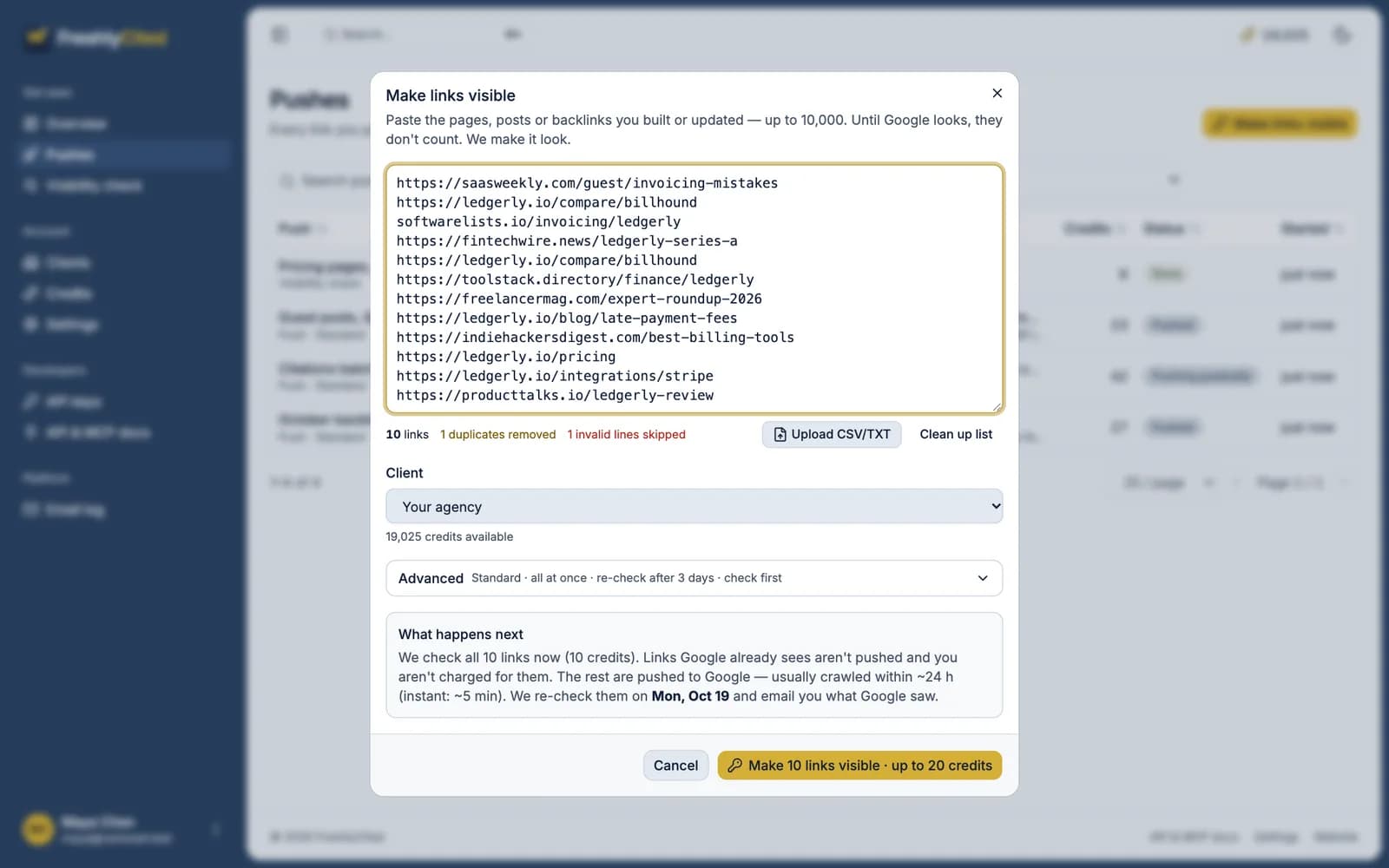
- Add your URLs. Paste a list or upload a file. These can be your own pages, backlink pages on other sites, or both.
- FreshlyCited checks each URL. A standard check costs one check credit per link.
- Review the results. Each URL is marked as seen by Google or invisible.
- Decide what to push. You can push just the invisible URLs to Google from the same results, so URLs that are already seen by Google aren't sent and no index credit is reserved for them.
- Re-check. After a push, FreshlyCited re-checks the URLs it sent automatically on days 1, 3 and 7, at no extra cost, and records the change. A pushed URL's index credit is used only if it's indexed; if it still isn't after the day-7 re-check, the credit comes back.
- Share the result. Each push has a shareable, revocable report link showing before and after, link by link.
If you want to try it on a real list, you can run a bulk visibility check on your own links.
Reading results: seen by Google vs invisible
Every URL in a bulk check ends up in one of two groups: seen by Google (indexed) or invisible (not indexed at the time of the check). The useful work is in understanding why each invisible URL is invisible.

Sort invisible URLs into these buckets before doing anything else:
Bucket | How to spot it | What to do |
|---|---|---|
Blocked | | Fix the block, or remove the URL from your list if the block is intentional |
Broken | 404, 410, 5xx, redirect chains | Fix or replace the URL; for backlinks, contact the site owner |
Link removed | Backlink page is live but no longer contains your link | Follow up with the publisher before spending anything on it |
New | Published recently, never crawled | Push it and re-check |
Passed over | Crawled before, still not indexed | Improve the page or accept that Google may not index it |
A few habits that keep results honest:
- Re-check before reacting. A single invisible result can be noise. Two or three consistent results over several days are a signal.
- Check the exact URL.
httpvshttps, trailing slashes and tracking parameters all count as different URLs. - Remember what "indexed" means. It means Google stored the page. It doesn't mean the page ranks, or that a link on it passes value.
Push only the invisible URLs
After a bulk check, push only the URLs that are invisible and eligible to be indexed. Pushing the whole list wastes money and asks Google to recrawl pages it already has.
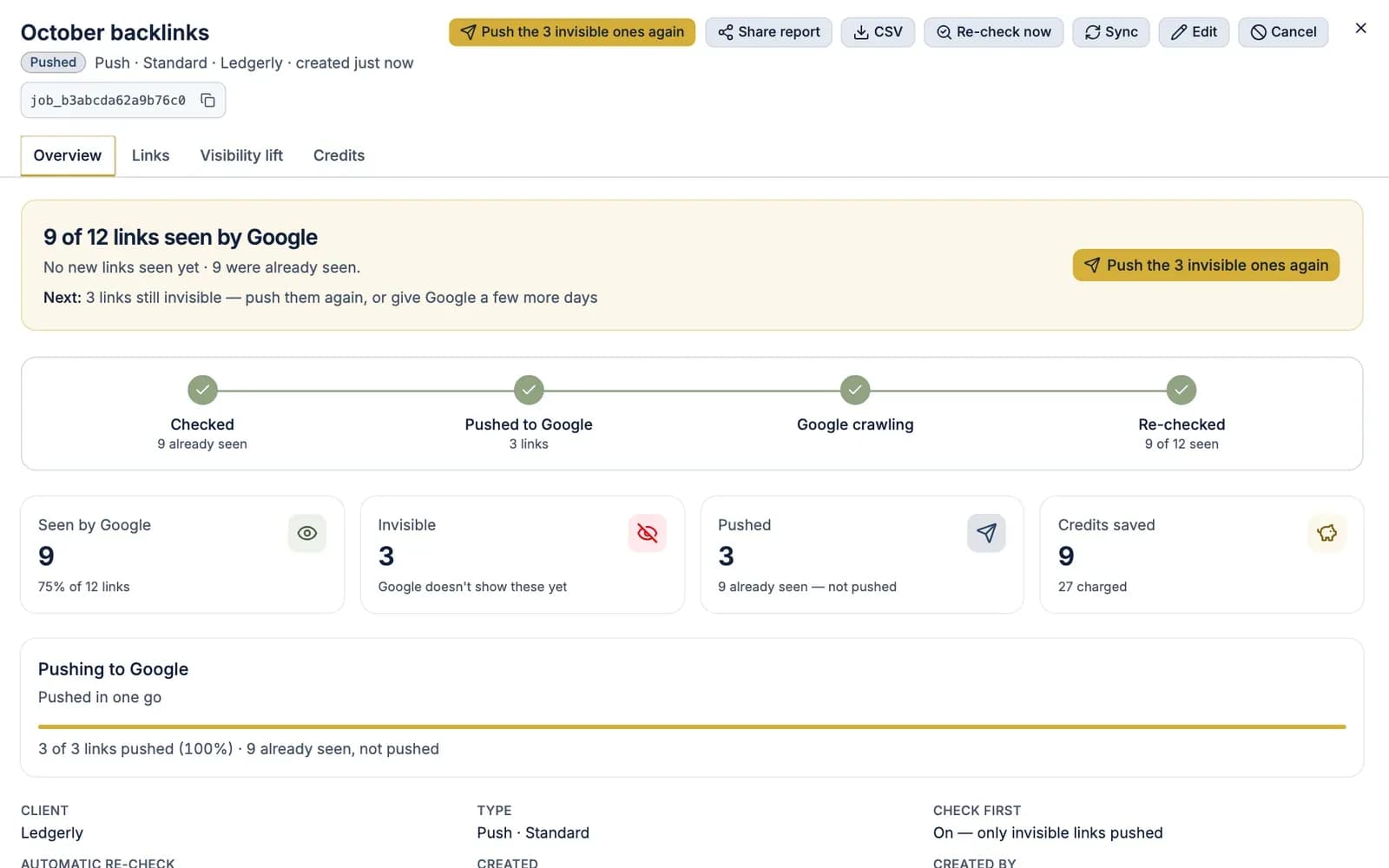
The logic is simple: check first, filter, push the remainder. On a typical backlink batch, a share of links will already be indexed by the time you check. Paying to push those again buys nothing. That's why FreshlyCited's push can check every link first (the check-first setting) and only send the ones Google can't see.
Before pushing, drop anything from the "blocked", "broken" and "link removed" buckets above. A push asks Google to look; it doesn't override a noindex tag, fix a 404 or put back a deleted link. For pages in the "passed over" bucket, a push alone rarely changes the outcome, because Google already crawled the page and decided not to keep it. Improve the page first.
Pushing also doesn't change Google's timeline. Google says crawling "can take anywhere from a few days to a few weeks" and that repeated requests for the same URL "won't get it crawled any faster" (Google: Ask Google to recrawl your URLs). Push once, then give it time.
Schedule re-checks and report results to clients
Indexing changes over days and weeks, so a bulk check is most useful when you repeat it on a schedule and keep the history. Re-checks show what a push actually achieved, and they catch pages that drop out of the index later.
A practical schedule:
- After a push: re-check the pushed URLs once Google has had time to look.
- Two to four weeks later: re-check again. Some URLs get picked up late.
- Monthly for paid links: linking pages can be removed, changed or dropped from the index.
- After site changes: re-check key templates after any deploy that touches robots rules, canonicals or rendering.
For agencies, the re-check gives you the record. Clients respond better to a link-by-link list with before and after than to a percentage. A useful report shows:
- The URLs checked, with the date of each check.
- Which were already indexed and which were invisible.
- What was pushed.
- What changed at the re-check.
Link builders who handle many clients will find more on this workflow in bulk checks for link builders. If your list is mostly backlinks, see the backlink index checker guide for what to check on the linking page.
AI answers cite what's been crawled, and they lean toward pages that are kept current. FreshlyCited helps Google discover and index the pages, posts and backlinks you publish or update sooner, so they become eligible for Google Search, AI Overviews and AI Mode, then re-checks and shows you what Google has indexed. Google's AI Overviews and AI Mode can only show a page as a supporting link if it is "indexed and eligible to be shown in Google Search with a snippet" (Google: AI features and your website), so regular checks on your key pages also tell you whether they're eligible for Google's AI features. Whether they're cited is still the engine's call.
Bulk checks over API and MCP
Recurring checks are easier to run from your own tools than by hand. FreshlyCited's REST API (full with any pack or Agency plan, read-only on Free) and MCP server (Agency Pro and Agency Scale plans) take the same input as the app: a list of URLs to check, and optionally which invisible ones to push.
Common ways teams use it:
- CMS publish hooks. When a page is published or meaningfully updated, send the URL for a check, then push it if it's invisible.
- Link tracking sheets and CRMs. When a link is marked live, add the linking page to a check.
- Client reporting. Pull results into your own dashboards or reports on a schedule.
- AI assistants. With the MCP server connected, an assistant can run a check on a URL list and summarize which pages are invisible, without you opening the app.
The same rules apply over the API as in the app: one check credit per link checked, and with check-first on, links already seen by Google aren't pushed. See bulk checks over the API for what the endpoints and MCP tools cover.
Whichever route you use, the loop stays the same: check, push only what's invisible, re-check, report. To try it on a list of your own, check your own links free.

Written by