On this page · 8 sections
- 01What makes a good SEO report
- 02Example 1: monthly SEO report
- 03Example 2: link building report
- 04Example 3: technical and indexing report
- 05Example 4: content performance report
- 06Example 5: AI visibility report
- 07SEO reporting format: structure, length and visuals
- 08Turn a template into an automated report

Every figure in these templates is illustrative, not real client data. Swap in your own. For the thinking behind the sections, see our SEO client reporting guide.
What makes a good SEO report
A good SEO report answers what was done, whether it worked and what happens next, in an order a non-SEO can follow. Whatever the report type, the same rules apply:
- Summary first. Three to five sentences a client can read in a minute.
- Records, not claims. Delivered work is listed with URLs and its status in Google, not just "12 links built".
- Trends with context. Compare with last period and last year, and explain any big move in one line.
- Few metrics. Three to five that tie to the client's goal. Everything else goes in an appendix.
- Next steps with owners. Including what you need from the client.
- The same structure every time, so clients learn where to look.
Example 1: monthly SEO report
A monthly SEO report is the standard retainer report: it summarizes the month's work and results and sets the plan for next month. It suits most ongoing SEO engagements.
Sections
- Summary
- Key metrics (organic sessions, conversions, Search Console clicks and impressions, priority rankings)
- Work delivered, with indexed status
- Issues and risks
- Next month's plan
- Appendix: keyword table, full link list, crawl findings
Sample summary (illustrative)
Key metrics block (illustrative layout)
Metric | This month | Last month | Same month last year | Note |
|---|---|---|---|---|
Organic conversions | [n] | [n] | [n] | One-line reason for the change |
Organic sessions | [n] | [n] | [n] |
|
Search Console clicks | [n] | [n] | [n] |
|
Priority terms on page one | [n] of [n] | [n] of [n] | — |
|
Example 2: link building report
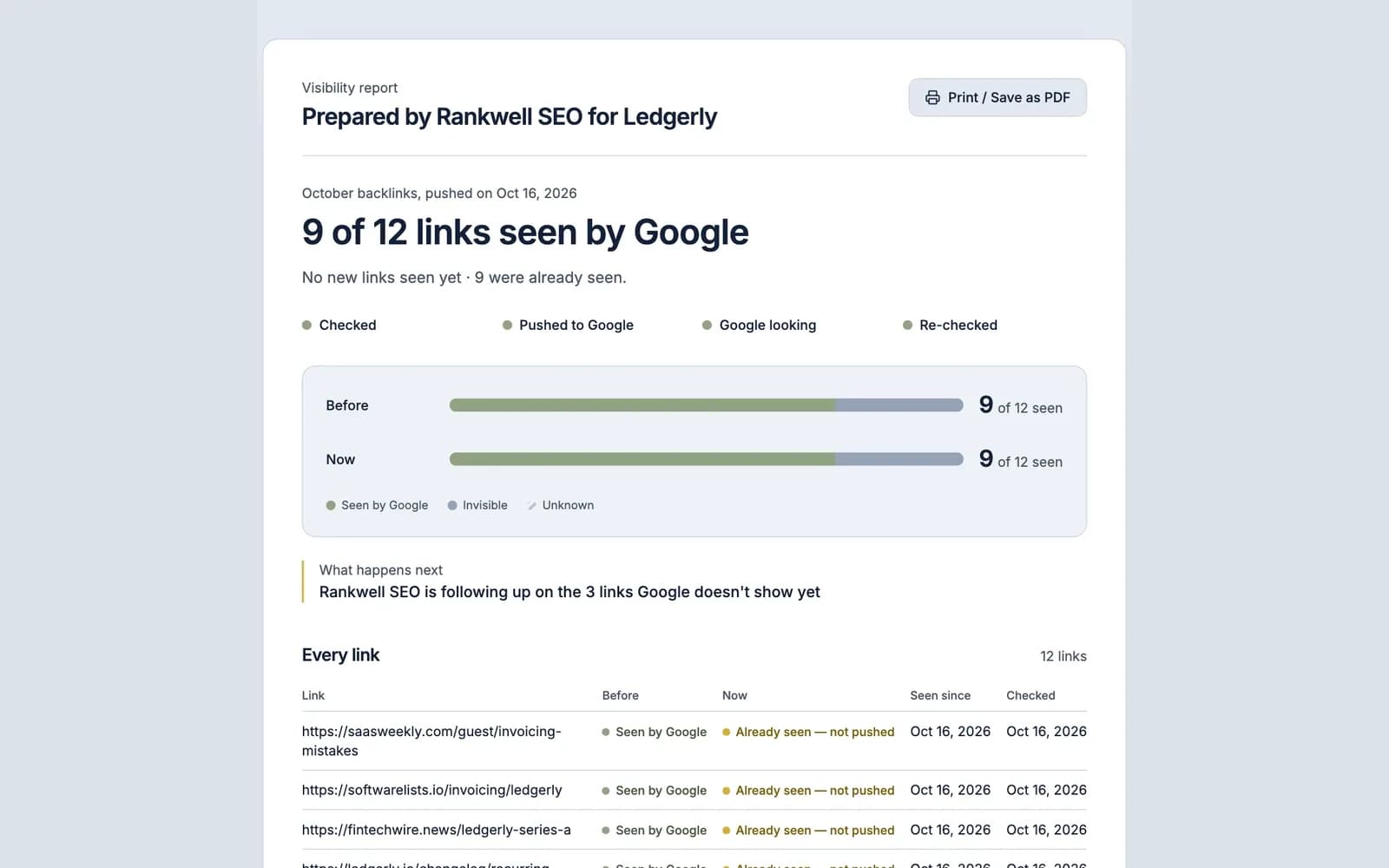
A link building report shows whether each link you were paid for is live, points where it should and is on a page Google has indexed. It's sent per campaign or per batch, and clients often read it line by line.
Sections
- Summary: links delivered, how many are seen by Google, any replacements owed
- Link table, one row per link
- Before and after: how many were seen by Google at delivery and now
- Issues: removed links, nofollow changes, pages still invisible to Google
- Next batch
Link table template
Linking page | Target URL | Anchor | Type | Live | Seen by Google at delivery | Seen by Google now | Action |
|---|---|---|---|---|---|---|---|
[URL] | [URL] | [text] | Guest post | Yes | No | Yes | — |
[URL] | [URL] | [text] | Niche edit | Yes | No | No | Pushed, re-check [date] |
The two "seen by Google" columns are what make this a delivery report. A link on a page Google hasn't indexed is unlikely to count yet, which is why backlink indexing is part of delivery, not an optional extra. Summarize the result in one sentence the client can repeat: "[x] of [y] links are seen by Google, up from [z] at delivery."
Example 3: technical and indexing report
A technical and indexing report shows whether Google can crawl and index the site, what's blocking it and what was fixed. It suits audits, migrations and sites with indexing problems.
Sections
- Summary: indexed pages trend, top issues, fixes shipped
- Page indexing: indexed vs not indexed, from Search Console, with the main "why pages aren't indexed" reasons
- Key URLs: the pages that matter most, each checked for whether Google has them indexed
- Issues found, ranked by impact (blocked by robots.txt, noindex, redirect chains, duplicates, slow server responses)
- Fixes shipped and their status
- Next fixes and what's needed from the client's developers
Issue table template
Issue | URLs affected | Impact | Status | Owner |
|---|---|---|---|---|
Crawled – currently not indexed (thin template pages) | [n] | High | Template rewrite in progress | Agency |
Redirect chains on old blog URLs | [n] | Medium | Fixed [date], awaiting recrawl | Client dev team |
Report Search Console's numbers as Google shows them, and add your own check of the key URLs. The Page indexing report's example list is capped at 1,000 URLs and isn't guaranteed to show every URL (Search Console help); a direct check of the URLs that matter gives the client a current answer.
Example 4: content performance report
A content performance report shows which published and refreshed pages are earning traffic and conversions, and which need work. It suits content retainers and SaaS teams publishing regularly.
Sections
- Summary: what was published or refreshed, the best performer, what's next
- New and refreshed pages: URL, date shipped, date seen by Google, clicks since
- Top pages by conversions, not just sessions
- Decaying pages: traffic down over three months, with a refresh recommendation
- Content plan for next period
Page table template
Page | Published or refreshed | Seen by Google | Clicks (28 days) | Conversions | Recommendation |
|---|---|---|---|---|---|
[URL] | Refreshed [date] | [date] | [n] | [n] | Keep |
[URL] | Published [date] | Not yet | — | — | Check internal links, push |
The "seen by Google" date matters more than it looks. A page shipped on the 3rd but not seen by Google until the 20th has had about ten days to perform by month-end, not four weeks, and the report should say so.
Example 5: AI visibility report
An AI visibility report tracks whether the client's brand and pages appear in AI answers for a fixed set of prompts, and whether the pages those answers could cite are indexed and current. It's the newest report type, so set expectations clearly: AI citations change daily and nobody controls them.

Sections
- Summary: what changed, with an honest note on volatility
- Prompt set results: for each tracked prompt and engine (Google AI Overviews and AI Mode, ChatGPT search, Perplexity, Copilot), was the brand mentioned, was a client page cited, which URL
- AI referral traffic from analytics (chatgpt.com, perplexity.ai, copilot.microsoft.com, gemini.google.com)
- Eligibility check: are the pages you want cited indexed and recently updated
- Next steps: pages to refresh, gaps to cover
Prompt table template
Prompt | Engine | Brand mentioned | Client page cited | Cited URL | Change vs last report |
|---|---|---|---|---|---|
"best [category] tool for [use case]" | ChatGPT search | Yes | No | — | New mention |
"[client] vs [competitor]" | AI Overviews | Yes | Yes | [URL] | No change |
Google says pages must be indexed and eligible for a snippet to appear as supporting links in AI Overviews and AI Mode (Google Search Central). So the eligibility section is the part of this report you can act on directly. Indexing is the first step; being cited still depends on quality, authority and relevance.
SEO reporting format: structure, length and visuals
The best SEO reporting format is whatever the client actually opens: usually a shareable link or a PDF with a one-page summary on top and detail in an appendix.
Choice | Recommendation |
|---|---|
Format | A link or PDF for clients; a live dashboard for in-house teams who check often |
Length | One page of summary and key metrics; everything else in the appendix |
Visuals | One trend chart per key metric; tables for link and page lists |
Language | Plain words; define any term a client wouldn't know |
Branding | Your agency's name, consistent every period |
Dates | Every check and metric has a date or a date range |
Avoid slide decks of tool screenshots. They take hours to build, and the client skims them.
Turn a template into an automated report
To turn a template into an automated report, fix the structure, connect each section to a data source and leave only the summary and recommendations to write by hand.
- Freeze the template. Same sections, same metrics, same order every period.
- Connect the data. Search Console and analytics for results; a rank tracker for priority terms; an index check for delivered links and pages.
- Schedule the checks. Check delivered work when it's delivered and again a few days later, so the report shows before and after.
- Generate, then edit. Let tools build the tables; write the summary and next steps yourself.
- Share one link. Send the same link format every time so the client knows where to look.
For the delivery sections (Examples 2 and 3), FreshlyCited client reports generate the link table automatically: any push can be shared as a report link showing every link's before-and-after status, ready to print as a PDF. On the Free plan it's FreshlyCited-branded; Agency Starter adds your logo with a "Powered by FreshlyCited" line; Agency Pro and Scale remove that line and add your colours and sender name.
AI answers cite what's been crawled, and they lean toward pages that are kept current. FreshlyCited asks Google to crawl the pages, posts and links you've published or updated, then re-checks and shows you which ones Google has indexed: the first step to being eligible for Google Search, AI Overviews and AI Mode. See how agencies use it in FreshlyCited for agencies, or check your own links free.

Written by