
On this page · 8 sections
- 01What clients actually want from an SEO report
- 02The core sections of an SEO client report
- 03Delivery records: links built, pages shipped, indexed status
- 04Rankings, traffic and AI visibility
- 05Reporting cadence: weekly, monthly or per campaign
- 06White-label reports and shareable links
- 07Automate the repetitive parts
- 08Reporting mistakes that cost client trust

Most reports fail on the second point. They show rankings and traffic charts, but not whether the links built and pages shipped this month exist in Google's index at all, and that's the step everything else depends on. AI answers cite what's been crawled, and they lean toward pages that are kept current. This guide covers what clients want from an SEO report, the sections to include, where delivery records fit, how often to report and which parts to automate.
What clients actually want from an SEO report
Clients want an SEO report to answer three questions quickly: what did you do for us, is it working, and what are you doing next. Everything else is supporting detail.
The person reading usually isn't an SEO. A founder or marketing lead reads the first screen and skims the rest. So the report has to be:
- Short at the top. A summary they can read in a minute, in plain words.
- Tied to their goals. Leads, sign-ups or revenue first, then the SEO metrics that move them.
- Verifiable. Links they can click, before-and-after numbers, dates.
- Honest about what's slow. SEO results lag the work by weeks or months. Saying so up front stops "nothing happened this month" calls.
A useful test: if the client forwarded only the first page to their boss, would it make sense?
The core sections of an SEO client report
The core sections of an SEO client report are a summary, work delivered (with its indexed status checked), results, issues found and next steps. Order matters: outcomes and delivery first, detail last.
Section | What goes in it | Length |
|---|---|---|
| Three to five sentences: the headline result, the main work, the next priority | A short paragraph |
| Links built, pages published or updated, technical fixes, each with its live and indexed status checked | A table |
| Organic traffic, conversions, rankings for priority terms, AI visibility; trends against last period and last year | Three to five metrics |
| Indexing problems, lost links, algorithm updates, anything blocked on the client | Bullets |
| What you'll do next period and what you need from the client | Bullets with owners |
Appendix | Full link lists, keyword tables, crawl exports | As long as needed |
Want to see these sections filled in for different kinds of engagement? Our SEO report examples walk through five templates.
Delivery records: links built, pages shipped, indexed status
A delivery record shows that the work you billed for exists and whether Google has indexed it: each backlink live on its page, each new or updated page published, and each one checked for whether Google has it indexed. It's the section that turns a report from a claim into a record.

Why it matters: a backlink on a page Google hasn't indexed is unlikely to count for anything yet, and a page Google hasn't indexed can't rank in Google or be cited in AI Overviews. Google says crawling can take "anywhere from a few days to a few weeks" (Google: Ask Google to recrawl), so "we built it" and "Google has seen it" are often different dates.
What a delivery table should show for each item:
Column | Example content |
|---|---|
URL | The page the link is on, or the page you published |
Type | Guest post, citation, niche edit, new page, refreshed page |
Live | Yes / no, date checked |
Seen by Google before | Yes / no / not checked |
Seen by Google now | Yes / no, date checked |
Action | None, pushed, replaced, chasing the publisher |
How to gather that record each period without a spreadsheet marathon:
- Log every deliverable as it lands. Keep one list per client of every link placed and page published or updated, with the date.
- Check it on delivery. Confirm each item is live and record whether Google has seen it. That's your "before".
- Act on the invisible ones. Fix obvious blockers (a
noindextag, a page with no internal links), then ask Google to crawl the rest. - Re-check a few days later. That's your "now", and the difference is the clearest evidence of progress you can show.
- Flag what's missing. Links that were removed or pages that stay invisible go in the issues section, with what you're doing about them.
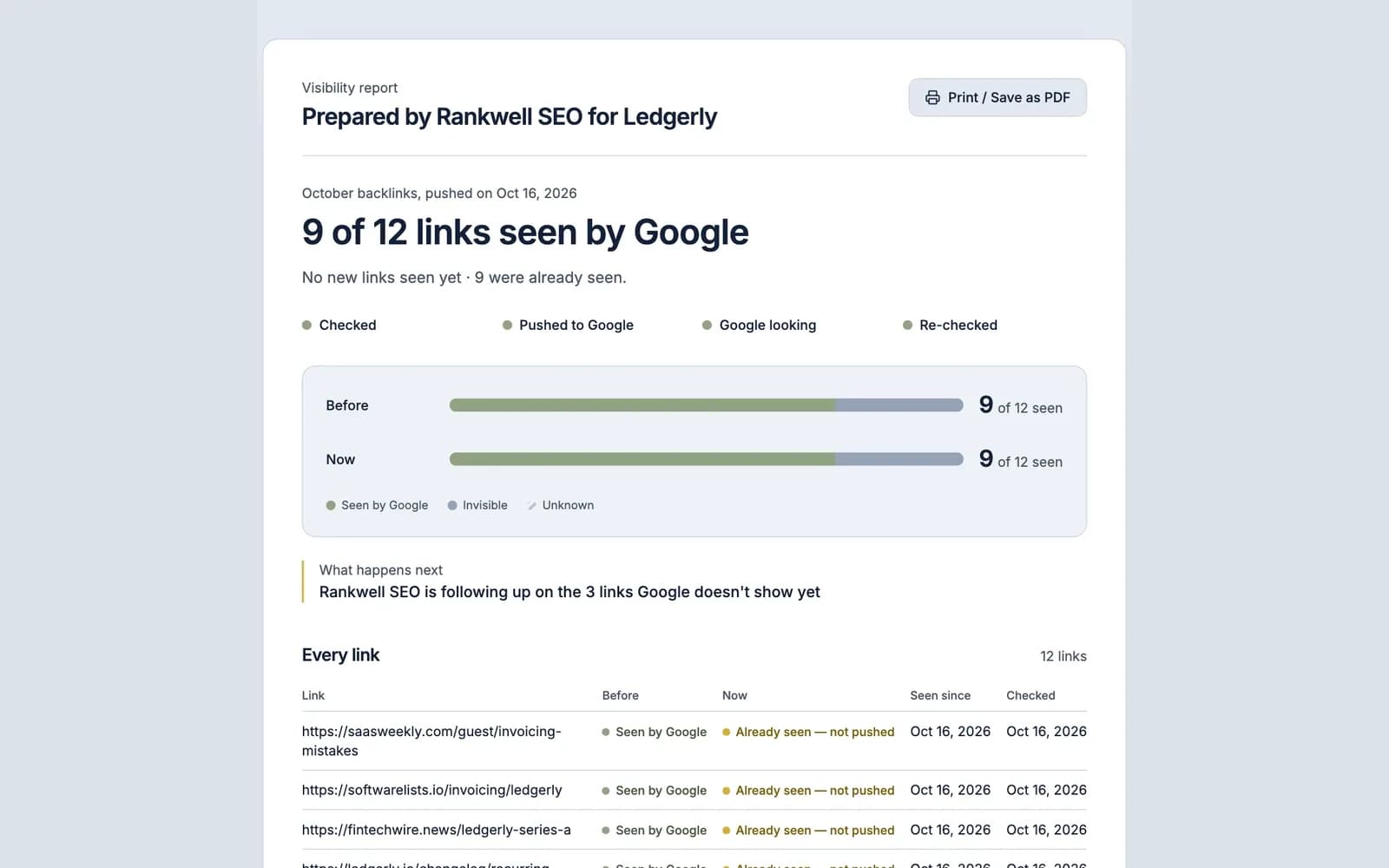
Report the total as a plain sentence: "33 of 40 links are seen by Google, up from 19 when we started." (Illustrative numbers.) For link-building retainers, this one line can matter more to the client than a ranking chart. We've written up how this works as reports for link builders, and our guide to backlink indexing explains why links on unindexed pages are unlikely to count yet.
Rankings, traffic and AI visibility
The results section of an SEO client report should show rankings, traffic and AI visibility as trends against a baseline, with one line of context for each change. Raw numbers without context invite the wrong questions.
- Organic traffic and conversions. Month over month and year over year, so seasonality doesn't look like failure. Use Search Console clicks and analytics sessions; tie to leads or revenue where you can.
- Rankings. A short list of priority terms, not 500 keywords. Show movement and the landing page.
- Search Console visibility. Impressions and average position for the pages you worked on.
- AI visibility. Whether the client's brand or pages are mentioned or cited for a fixed set of prompts in Google AI Overviews, ChatGPT search, Perplexity and Copilot, plus referral sessions from those assistants. Google counts AI Overviews and AI Mode traffic inside the overall "Web" search data in Search Console's Performance report (Google Search Central), so citations are usually tracked with a repeatable prompt set. See how to report AI visibility.
Be careful with attribution. AI citations shift from day to day, and nobody controls them. Report them as observations ("cited in 4 of 20 tracked prompts this month", to use an illustrative example), not as a result you delivered.
Reporting cadence: weekly, monthly or per campaign
The right reporting cadence depends on the work. Monthly suits most SEO retainers, per-campaign reporting suits link building and launches, and weekly suits short, high-stakes projects such as migrations.
Cadence | Best for | What to include |
|---|---|---|
Weekly | Site migrations, launches, recovery work | Short status: done, blocked, next. Indexing of key URLs |
Monthly | Ongoing retainers | Full report: summary, delivered work and its indexed status, results, next steps |
Per campaign | Link building batches, content sprints | Every link or page delivered, seen-by-Google status before and after |
Quarterly | Strategy reviews | Trends, what worked, plan for next quarter |
Many agencies combine them: a per-campaign delivery report when a batch of links is delivered, plus a monthly results report. Clients see the delivery record when the work lands and results when there's enough data to read.
White-label reports and shareable links
A white-label SEO report carries your agency's name and branding instead of the tool vendor's, so the client sees one consistent relationship. A shareable link lets the client open the report without an account and see the current numbers instead of a stale attachment.

What to look for in white-label reporting:
- Your agency's name on the report, with tool branding kept minimal.
- A link the client can open without logging in, which you can revoke when the engagement ends.
- A print or PDF option for clients who forward reports internally.
- Report pages kept out of search results (
noindex), since they contain client data.
FreshlyCited's white-label client reports work this way for delivery records: any push can be shared as a revocable report link showing each link's before-and-after status in a print-to-PDF layout. Branding depends on the plan: reports on the Free plan carry FreshlyCited's branding, Agency Starter adds your logo (with a small "Powered by FreshlyCited" line, as on Free), Agency Pro removes that line and adds your colours and sender name, and Agency Scale adds a custom domain.
Automate the repetitive parts
Automating SEO client reporting means letting tools collect data and fill templates, while people write the summary and recommendations. The numbers can be automatic. The judgement can't.
Automate:
- Pulling Search Console and analytics data on a schedule.
- Checking whether delivered links and pages are seen by Google, and re-checking later.
- Formatting tables and charts in a fixed template.
- Sending or sharing the report on a fixed date.
Keep human:
- The three-sentence summary.
- Explaining why a metric moved.
- Recommendations and next steps.
- Anything that admits a problem. Clients forgive problems you flag; they don't forgive ones they find.
Reporting mistakes that cost client trust
The reporting mistakes that cost the most client trust are the ones that make work look bigger than it is or hide what isn't working.
- Vanity metrics first. Total keywords ranked or domain rating at the top, conversions buried or missing.
- No delivery record. A list of links with no check that they're live or seen by Google.
- Claiming credit for everything. Traffic rose because of a seasonal peak or a paid campaign, and the report implies SEO did it.
- Guarantees. Promising rankings, indexing or AI citations. Google decides what it indexes and ranks, and each AI engine picks its own sources.
- Tool dumps. Fifty pages of exported screenshots no one reads.
- Silence on problems. Lost links, indexing drops or blocked tasks left out until the client notices.
- Changing the metrics. Switching what you report when numbers dip. Keep the same core metrics period to period.
A delivery record is one of the quickest ways to build client trust, because it answers the question every client has but rarely asks: is the work we paid for actually there? See how agencies use FreshlyCited for it in FreshlyCited for agencies, or check your own links free.

Written by